An AI agent’s most important feature isn’t how much it can do. It’s how clearly its actions are bounded. If a fixed sequence of steps can solve the problem, an agent may add unnecessary complexity. If the system must interpret changing context and choose what to do next, carefully designed autonomy can help. To build AI agents that work reliably, start with the workflow, not the model.
It’s reasonable to be cautious. Tool access, connected data, memory and model choice all affect an agent’s behaviour, and a mistaken action can have real consequences. Reliability comes from defining what the agent may do, testing how it responds to expected and unexpected inputs, and requiring human approval where the stakes call for it.
This practical guide lays out a repeatable path from problem definition to deployment. You’ll learn how to distinguish an agent from a simpler AI workflow, specify its role, select tools and data, and evaluate its behaviour before it acts in production. We’ll also cover permissions, oversight and the signals that tell you an agent isn’t necessary, so your prototype is useful, testable and appropriately controlled.
Key Takeaways
- Decide whether the task needs model-guided choices or can be handled by simpler, predictable automation.
- To build AI agents responsibly, define the agent’s role and limit its tools to approved actions and relevant information.
- Match the design to the workflow’s variability, required oversight and potential impact if something goes wrong.
- Test normal scenarios, edge cases and adversarial inputs, then refine the agent based on what those tests reveal.
- Before rollout, review access and ownership, then monitor errors, policy exceptions, quality and user-reported failures.
Before You Build an AI Agent, Define the Job It Must Do
Does this workflow need an agent, or would simpler automation do the job? Start there. An AI agent introduces model-guided decisions into a process. This can help when inputs vary, but it also creates new ways for a workflow to behave unexpectedly. The objective isn’t to add autonomy for its own sake. It’s to solve a defined problem with an appropriate level of control.
An AI agent is a system that uses a model to select bounded actions toward a defined goal, within the instructions, tools and oversight set by its operator. Goal-directed behaviour and tool use are among the features described in this foundational overview of an AI agent. The key word is “bounded”: an agent’s ability to choose a next step doesn’t mean it should have unrestricted access or authority.
A fixed process with stable rules, such as applying a consistent format to every record, is usually better served by conventional automation. An agent may be a better fit when the task requires interpreting varied context and choosing among approved next steps. For example, a system might help classify incoming documents for review, while a person remains responsible for consequential decisions. Before you build AI agents, establish what decision-making the task actually requires.
Choose a narrow, measurable use case
Begin with one repeated task, a clearly identified user and an observable completion condition. Document the workflow as it exists today: what information enters, what output is expected, where exceptions arise and who is accountable for the result. This gives the team a baseline for evaluating whether the proposed agent helps and makes responsibility visible from the outset.
Choose a low-consequence pilot where a person can review proposed actions before they take effect. For instance, an agent might suggest a category for a document, with an employee confirming or correcting it. Define success in operational terms, such as whether the output follows agreed criteria and whether exceptions reach the right reviewer. Avoid beginning with a task where a mistaken action would be difficult to reverse.
Decide whether an agent is the right approach
Use conventional automation when the rules are stable and each input leads to a predictable action. Consider an agent when context varies enough that a model must interpret information or select among a limited set of approved tools. The distinction is not whether a task sounds advanced. It’s whether flexible, model-guided choices provide value that a simpler process cannot deliver.
Don’t prototype a workflow that can’t be evaluated or safely interrupted. If the team can’t describe an acceptable result, identify a responsible owner or pause the process when uncertainty arises, the task needs more definition first. A disciplined scope keeps the initial design testable and creates a sound basis for deciding which model, tools, data and operating boundaries the system will require.
Design the Agent’s Model, Tools, Data, and Operating Boundaries
Once the workflow is defined, translate it into a small set of components: a model to interpret context, instructions that establish the task, approved tools for specific actions, relevant information to work from, and an execution loop that determines what happens next. Keep each component accountable to the workflow. The model proposes a step, and the system validates whether that step is permitted before anything consequential occurs.
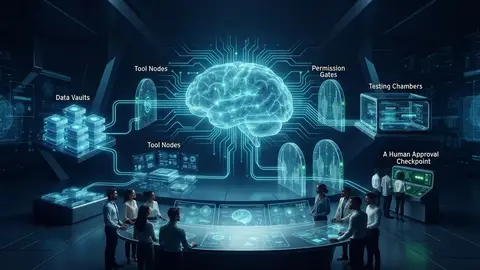
The model interprets, tools perform only approved actions, and guardrails define when the agent must stop or ask for human review. Tool calling should work like a controlled interface, not a direct line to every system an organisation uses. For example, a document-review agent might retrieve a record and prepare a suggested classification, but lack permission to alter the source file or approve a related transaction.
Context and memory also need deliberate limits. Conversation context helps the agent respond within the current interaction. Durable records are information stored for future use and should be governed separately. Retain only what the task needs, establish who can access it, and define how long it remains available. A system that must consult approved documents may use retrieval-augmented generation (RAG), which retrieves relevant source material for the model rather than relying on the model’s general knowledge alone.
Connect only the data and tools the task requires
Create an inventory for every tool before connecting it. Record its purpose, permitted inputs, allowed actions and expected failure response. If a retrieval tool can’t find a relevant source, for instance, the agent should report that limitation or hand off for review, not invent an answer. Grant the minimum access necessary, keep credentials out of prompts and model-visible context, and avoid exposing sensitive information that isn’t required to complete the task.
This is a design discipline, not a final security check. The NIST AI Risk Management Framework offers a voluntary structure for considering AI risks across design and use. Teams can use it as a reference when documenting boundaries, assigning oversight and deciding how to handle failures.
Choose a simple architecture before adding orchestration
Start with one agent and a limited tool set if one contained workflow can be handled that way. Add multiple agents only when distinct responsibilities justify the additional coordination, handoffs and failure paths. More components can make a design harder to test and govern, not automatically more capable. Integration protocols, including MCP, may be implementation options, but assess their current suitability against your security, compatibility and operational requirements before selecting one.
To build AI agents that are maintainable, make the architecture legible: identify what the model can decide, what tools can change, what data the system can access and where a person must intervene. For organisations assessing these choices across interconnected workflows, AI transformation advisory may help frame the technical design alongside integration and governance needs.
Compare Agent Patterns and Choose the Safest Fit
Architecture should follow the workflow, not a preference for greater complexity. A deterministic process, a single tool-using agent and a coordinated multi-agent system differ in how they handle variation, share responsibilities and fail. As autonomy and coordination increase, so does the need to evaluate decisions, track actions and establish operational controls. More agents do not automatically mean better results.
Use this comparison to identify a proportionate starting point. Failure impact depends on what the system can change and how easily an error can be caught or reversed.
| Pattern | Variability | Tool access | Oversight needs | Potential failure impact |
|---|---|---|---|---|
| Deterministic workflow | Low; rules and paths are stable | Predefined system actions | Review exceptions and rule changes | Usually contained to a predictable step, but faulty rules can repeat consistently |
| Single tool-using agent | Moderate; context influences its next step | Small, approved tool set | Review uncertain or consequential decisions; inspect action logs | May choose an unsuitable action or use a tool incorrectly |
| Coordinated multi-agent design | Higher; tasks are divided and coordinated | May span tools across distinct responsibilities | Monitor both agent outputs and handoffs between them | Errors can propagate or compound across steps |
When a single agent is enough
One agent is often sufficient when a bounded task requires contextual interpretation and a small set of tools. For example, it could review a cashflow report, retrieve relevant approved information and prepare a summary for an analyst, without making changes to the underlying records. Keep each action observable, specify when the agent must stop, and route uncertain or consequential decisions to an accountable human reviewer.
This pattern keeps the decision path easier to inspect than a network of agents. Before expanding it, check whether the single agent can complete the task reliably within its defined limits. If not, identify the specific limitation rather than adding complexity by default.
When to consider multiple agents or an established framework
Consider orchestration when work separates into distinct, testable responsibilities that benefit from coordination. For example, one component might extract information while another checks it against an approved source, with a final step assembling a reviewable result. Each handoff needs a defined input, output and failure response. Otherwise, delegation can obscure where an error began.
Assess frameworks against your actual requirements: maturity, integrations, observability, security and ongoing maintenance. No model or framework is universally best. Verify current features and protocol compatibility in the relevant documentation, then test the chosen architecture against representative workflows. The soundest way to build AI agents is to select the least complex pattern that meets the task’s needs and can be evaluated in operation.
Build AI Agents and Test Them in Controlled Steps
A prototype isn’t ready for live work simply because it produces convincing answers. It needs to demonstrate that it can complete its specific task, use tools correctly, recognise uncertainty and recover safely when something goes wrong. Use a repeatable build process, and treat evaluation as a release requirement, not a final polish.
An agent should pass task-specific tests before it handles live work, because plausible output alone doesn’t show that its decisions and actions are safe or dependable. A practical sequence keeps development focused:
- Specify the task. State who the agent serves, what outcome it must produce and how a reviewer will judge completion.
- Define boundaries. Document what the agent may decide, which requests fall outside scope, and when it must stop or escalate.
- Implement tools. Connect only the approved tools required for the task, with defined inputs, permissions and failure responses.
- Test performance. Evaluate normal cases, edge cases and adversarial inputs against agreed criteria.
- Refine the design. Investigate failures, update instructions or controls, then rerun the relevant tests before widening access.
Measure more than task completion. Check whether responses are grounded in approved sources, tool calls use valid inputs and permitted actions, and the agent escalates appropriately when uncertain. Also test recovery: does it report an unavailable tool, retry only when appropriate, and stop safely rather than improvising?
Prototype with explicit instructions and observable actions
Write instructions that specify the goal, limits, permitted tools and required output. Keep them clear enough that a reviewer can tell whether the agent followed them. During early testing, use synthetic or otherwise approved data in line with organisational policies. Record model decisions, tool calls, returned data, errors and human interventions so the team can trace how an outcome occurred, not just inspect the final response.
Evaluate failure modes before widening access
Test inputs that are incomplete or incorrect, tools that are unavailable, conflicting sources and requests outside the task’s scope. Define in advance when the agent should refuse, request human review, retry or terminate safely. For example, conflicting source information may require escalation instead of a confident answer. Document known limitations, assign an owner to review results and update the test set when the workflow or connected tools change.
Use these controls to build AI agents incrementally: begin with a reviewable prototype, address observed failures, then consider a limited rollout only when evaluation supports it. To develop an enterprise agent with structured testing and controls, explore AI transformation consulting and advisory.
Deploy and Improve the Agent with Governance and Human Oversight
A successful prototype is evidence to consider, not permission to deploy broadly. Move to a limited rollout only after reviewing test results, checking access against the intended role and naming an accountable owner. Begin with a defined group or workflow, retain human approval for consequential actions, and make it possible to pause or reverse the agent’s actions if a control fails.
Production oversight needs observable signals. Monitor output quality, tool errors, policy exceptions, changes in behaviour over time and user-reported failures. Pair monitoring with clear response procedures: who reviews an alert, when an incident is escalated, how access or actions are suspended, and how a change is assessed before release. Without ownership and rollback procedures, a technically successful deployment can still be operationally fragile.
Establish governance for real-world use
Document which data the agent can access, what decisions it may make, which actions require approval, what audit records are retained and who handles escalations. Set retention and review practices in line with organisational policy. The NIST AI Risk Management Framework can serve as a voluntary reference for structuring risk management. Assess applicable requirements with the appropriate internal or external experts rather than assuming one control set fits every organisation.
Choose the next step based on organisational readiness
For a contained task, keep the pilot narrow and measure outcomes against the criteria established during testing before expanding its scope. For a complex enterprise workflow, first assess integration dependencies, governance responsibilities and whether the underlying process needs redesign. Changes to tools, data, instructions or model configuration should trigger appropriate review and testing, with records that make the decision path clear.
Readiness is not measured by how much autonomy an organisation can enable. It’s measured by whether teams can monitor behaviour, respond to failures and maintain clear accountability as the system changes. Expand autonomy only when evidence supports the next step. Organisations considering broader adoption can also explore relevant guidance on enterprise AI agent integration and AI transformation roadmaps, then explore AITHENTIC’s enterprise AI approach as a low-pressure next step.
To build AI agents for sustained use, treat deployment as the start of an operating cycle: monitor, learn, review and adjust under accountable oversight.
Turn a Defined Use Case into Responsible Progress
Reliable agents begin with a clear job, not the broadest possible autonomy. Choose the simplest architecture that fits the workflow, connect only the tools and data it needs, and test how it behaves when conditions aren’t straightforward. Then use evaluation results, human oversight and ongoing monitoring to guide any expansion.
That disciplined approach helps teams build AI agents that support real work while keeping decisions, access and accountability visible. It also makes clear when conventional automation is the better choice. The aim isn’t to deploy an agent everywhere; it’s to make a well-governed improvement where contextual decision-making adds value.
For organisations considering how agents fit into wider operations, AITHENTIC provides AI transformation advisory and bespoke agent development. Its AITHENTIC F-OS Finance Operating System integrates data, people and processes for finance operations. Explore AITHENTIC’s enterprise AI approach to consider how a structured approach could fit your organisation.
Start with one defined workflow, learn from the evidence, and expand only when your controls are ready. Thoughtful progress can turn a promising prototype into a dependable part of how work gets done.
Frequently Asked Questions
How do you build an AI agent from scratch?
Start by defining one task, its user and an observable completion condition. Then specify the agent’s limits, approved data and tools, and what it should do when it’s uncertain. Build a small prototype, test it with normal, edge-case and adversarial inputs, and review its decisions and tool actions. Before live use, check access, assign an accountable owner and establish monitoring, human review and a way to pause or roll back actions.
Can you build an AI agent without coding?
Yes, visual development tools may support a limited prototype without writing code. You’ll still need to define the workflow, configure instructions and connections, and test the agent’s outputs and actions. For enterprise use, the harder work often involves secure integration, appropriate permissions, data handling, monitoring and governance. Assess whether the chosen platform supports those requirements, and involve technical expertise where needed rather than treating a no-code setup as automatically production-ready.
What is the difference between an AI agent and a chatbot?
A chatbot is primarily designed to communicate through conversation, while an AI agent can use model-guided actions and approved tools to pursue a defined task. The categories can overlap: an agent may have a conversational interface, and a chatbot may connect to tools. The practical distinction is what the system is authorised to do, not how it appears to a user. Evaluate its permissions, action boundaries and oversight requirements.
Which programming language is best for building AI agents?
There’s no universally best language. Python may suit teams working with AI libraries and data-processing systems, while JavaScript or TypeScript may fit applications built around a web stack. The choice should reflect your developers’ skills, existing infrastructure, integration needs and maintenance capacity. Before selecting frameworks or protocols, check their current documentation and compatibility. Language choice matters, but it can’t replace clear task boundaries, evaluation and operational controls.
How do you make an AI agent reliable and safe?
Define what the agent may decide, which tools it can use and when it must stop or ask for human review. Test representative normal cases, edge cases, conflicting information and requests outside its scope. Evaluate task completion, source grounding, tool correctness, escalation and error recovery. During rollout, monitor failures and policy exceptions, review access, and maintain clear ownership, incident escalation and rollback procedures. Expand permissions only when test and operational evidence support it.
When should a business use an AI agent instead of automation?
Use conventional automation when rules are stable and inputs lead to predictable actions. Consider an agent when context varies and selecting among bounded, approved actions can help complete the task. For example, fixed rules may route standard records, while an agent could interpret varied documents and prepare a proposed classification for human review. If the task can’t be evaluated, interrupted or safely reviewed, clarify the process before considering an agent.